AI Protection
Protect sensitive data while enabling productive AI use
Safetica AI Protection gives security teams visibility into AI activity and sensitive data sharing, with granular controls that help prevent sensitive data exposure without unnecessarily restricting AI access.
AI Protection
Protect sensitive data while enabling productive AI use
Safetica AI Protection gives security teams visibility into AI activity and sensitive data sharing, with granular controls that help prevent sensitive data exposure without unnecessarily restricting AI access.
AI is changing how employees interact with sensitive data
Generative AI is becoming part of everyday work, creating new paths for sensitive data exposure through prompts, pasted content, file uploads, and other AI interactions.
Security teams need visibility beyond which AI tools employees use. They need to understand what sensitive data is being shared, who is sharing it, and how it is being used without unnecessarily restricting productive AI use.
Gain control without blocking AI access
Understand how employees use AI, see sensitive data in context, and apply the right level of protection based on the risk.
|
Discover AI use See approved and shadow AI applications employees are using across your organization. |
Understand sensitive data See what sensitive data is being shared, who is sharing it, where it is going, and how it is being used. |
Protect data before AI Apply DLP policies to control sensitive files, pasted content, prompts, and risky user actions before data reaches AI. |
Apply granular controls Set controls based on AI application, data sensitivity, employee, department, and activity. |
Investigate AI risk Add context to AI activity to determine the appropriate response instead of blocking AI access entirely. |


Gain visibility and control as employees increase AI activity
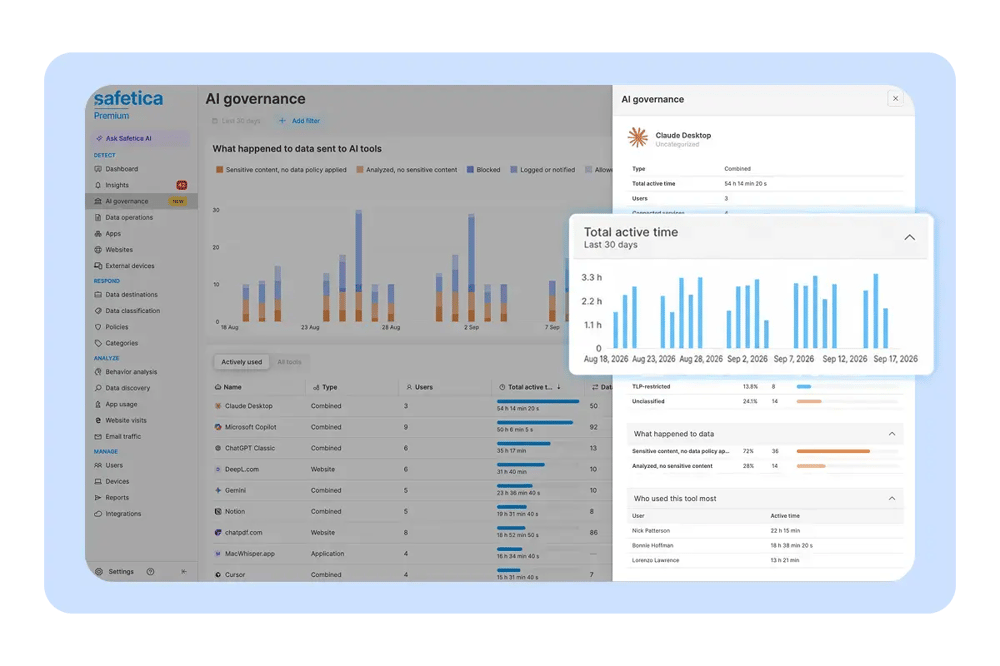
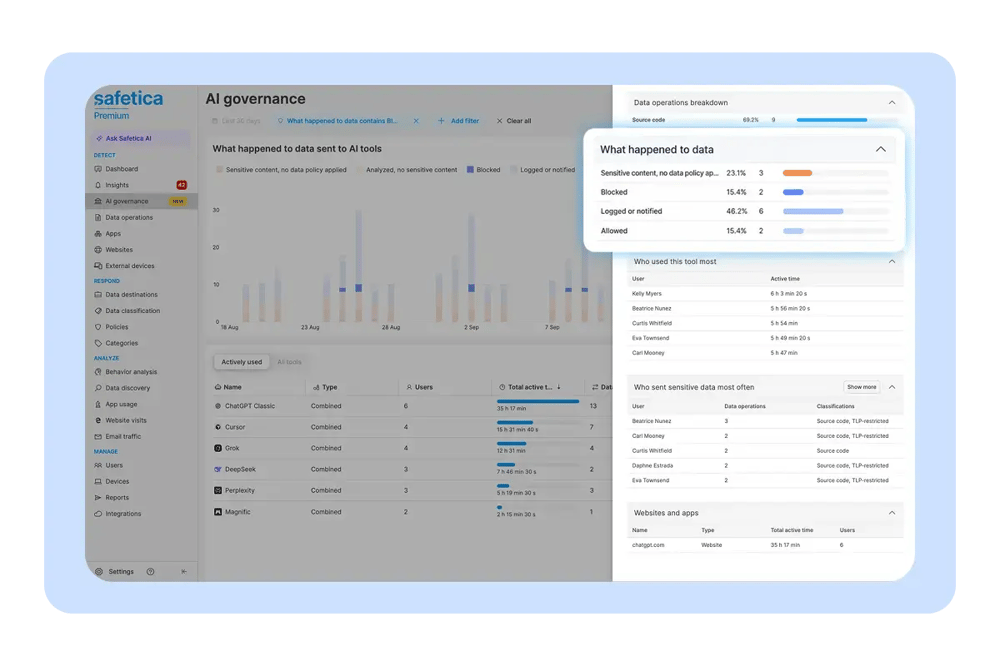
Safetica AI Governance helps security teams understand and govern approved and shadow AI use by providing visibility into the applications employees use, what data they share, and where to apply controls.
- Discover your AI environment: Maintain a centralized view of approved and shadow AI applications across the organization.
- Understand AI activity: See who uses AI, how frequently applications are accessed, what data and files are shared, and the protection currently in place.
- Turn visibility into control: Monitor activity, restrict sensitive data sharing, limit access for specific users or groups, or block risky tools entirely.
- Investigate with context: Use embedded, AI-guided prompts to explore usage and risk, summarize findings, and identify actions that can strengthen protection.
Protect sensitive data before it reaches AI
Safetica extends DLP protection into AI interactions, giving security teams granular control over sensitive information shared through files, pasted content, and prompts.
- Protect sensitive data before it reaches AI tools: Apply DLP policies to monitor and control sensitive file attachments, pasted text, prompts, and other data shared with ChatGPT, Claude, and Microsoft Copilot.
- Apply controls based on context: Define policies according to data sensitivity, AI tool, employee, department, and specific user action rather than completely blocking AI access.
- Protect data across application and browser use: Maintain protection across supported desktop applications and Chromium-based browser experiences on macOS and Windows.
- Allow productive AI use to continue: Restrict risky data-sharing actions without unnecessarily blocking productive access to approved AI tools.
AI is already part of the data protection challenge
Safetica's H1 2026 Data Protection Trends research shows how quickly AI has become part of the data protection landscape.
40.7%
AI tools became the No. 1 risky application category in Q2, accounting for 40.7% of risky app activity.
82.3%
ChatGPT and Microsoft Copilot accounted for 82.3% of blocked AI activity.

See AI Protection in action
Explore the demo to the right to see how Safetica helps security teams understand AI activity, investigate risk, and protect sensitive data during AI interactions.
Get the AI Protection overview
See how AI Governance and DLP for AI assistants help security teams understand AI activity and protect sensitive data.

Frequently asked questions
What is Safetica AI Protection?
Safetica AI Protection helps security teams understand how employees use AI and share sensitive data. It provides visibility into approved and shadow AI use and granular controls to protect sensitive information while supporting productive AI use.
What is the difference between AI Governance and DLP for AI assistants?
AI Governance provides visibility into approved and shadow AI use, including which applications employees use, what data they share, and where additional controls may be needed.
DLP for AI assistants protects sensitive data during AI interactions by applying policies to files, pasted content, prompts, and other data shared with supported AI assistants.
Which AI assistants does Safetica protect?
Safetica supports DLP protection for commonly used AI assistants, including ChatGPT, Claude, and Microsoft Copilot.
Can Safetica protect sensitive data without blocking access to AI?
Yes. Security teams can apply granular controls based on factors such as data sensitivity, AI application, employee, department, and user action. This allows organizations to restrict risky data-sharing activities without unnecessarily blocking productive access to approved AI tools.
Can Safetica identify shadow AI use?
Yes. AI Governance provides a centralized view of approved and shadow AI applications, helping security teams understand which AI tools employees use and where additional protection may be needed.
Does Safetica protect AI use in browsers and desktop applications?
Safetica provides protection across supported desktop applications and Chromium-based browser experiences on macOS and Windows.
See What Safetica Customers Have to Say
See what customers say about using Safetica to protect sensitive data and manage data security.